Creative Computing on the BBC micro:bit with Bare-Metal ARM Assembly
01 Aug '25
In September 2022, I gave a talk at the University of Oslo’s Robotics and Intelligent Systems lab about my experience teaching COMP2300: Computer Organisation and Program Execution at ANU. The core idea: teach second-year computing by writing creative ARM assembly programs and running them directly on real hardware. No operating system, no runtime, no guard rails. The course content is archived at twenty-three-hundred.
The goals were:
- To build and cement mental models for computer organisation and code execution
- To give students the transformational experience of running code right on the metal
tl;dr: Can students do it? Yes!
Here’s the talk:
In this post, I’ll write out the slides and expand a bit on this experience. Looking back, this was transformational for me as well, as I had committed a new way of running this class and the assessments and weekly live-coded lecture demos were all new. The end point of the talk was a high-point of the course: live-coding a MIDI output on the microbit and sending MIDI messages to a synthesiser live in the lecture. It seems basic, but going from add r0, #1 to MIDI in 12 weeks felt like an incredible journey.
The Hardware
The course uses the BBC micro:bit v2, a small ARM Cortex-M4 board designed for education. It has a 5x5 LED grid, buttons, a speaker, microphone, accelerometer, and a Bluetooth radio. Plenty of peripherals to make programming tangible and creative.
Bare-Metal ARM Assembly
We start from scratch. The minimal bare-metal program looks like this, built and flashed with this .ld linker script and this Makefile:
.thumb
.syntax unified
    .global __reset

.section .vectors
.word __stack
.word __reset

.text
.thumb_func
__reset:
    mov r0, #0
loop:
    add r0, #1
    nop
    b loop
This sets up the vector table, defines a reset handler, and loops forever — that’s it. No C library, no startup code beyond what students write themselves. To keep the course accessible, a short startup.S program handles loading static .data into RAM and setting up the interrupt vector, so students can write their main function in a slightly more familiar pattern:
.syntax unified
.global main

.type main, %function
main:
  nop
  ldr r0, =hello

  b main
.size main, .-main

.data
hello:
.word 0x424242
Throughout the course, we got to know this snippet very well. It was the starting point of every lecture demo, lab and assignment for the students.
Toolchain
The toolchain is built around Visual Studio Code:
- COMP2300 VS Code extension
-
COMP2300 toolchain
- xPack OpenOCD
-
xPack GNU Arm Embedded GCC (
arm-none-eabi— gcc, gdb, ld, objcopy, as) - COMP2300 discoserver: ARM Cortex-M4 CPU emulator (by Benjamin Grey), so students can test code without hardware
make
- baremetal micro:bit VS Code template
- baremetal example
Part of making this course inclusive and welcoming for students at all levels was providing a completely effortless toolchain with great debugging tools available. I made sure that students on all OSs would be able to install all the tools they needed from within VS Code. I need to thank my tutor team for incredible work here. Harrison Shoebridge and Brent Schuetze developed the VS Code extension and Benjamin Grey (incredibly) put together an ARM CPU emulator, so students could test basic code without a microbit plugged in.
The Course
COMP2300/COMP6300 is a second-year computing course, obligatory for all undergraduate computing majors, the ANU equivalent of “intro to computer systems.” Since 2020 it has enrolled over 400 students per semester, with 325 passing in 2022. The course has moved on a bit with more emphasis on digital logic since I last taught it in 2022 but my version of the curriculum is archived at twenty-three-hundred.
The curriculum covers:
- Digital logic, CPU architecture
- Machine instructions, ALU operations
- Memory and memory instructions
- Conditional execution and control flow
- Functions
- Toolchains and compilers
- Data structures in assembly
- Interrupts, context switches, asynchronism
- Networks
- Operating systems
- CPU architectures
Labs are the core of the course. They start with mov r0, #1 and end with students implementing a context switch between two programs — their own miniature OS.
The Assignments
Two open-ended creative programming assignments give students latitude to make something genuinely their own.
Assignment 1: Lightshow — use the LED matrix to create a light show that changes over time. The speaker is allowed; input peripherals are not. This scopes the task while still leaving enormous creative space. Students need ALU operations, memory operations, conditional branching, and control structures (if/then/while/for in assembly). Functions, shifting operations, and reading the nrf52833 hardware manual help a lot.
Assignment 2: Digital Pet — build an interactive digital pet displayed on the LED matrix. Requirements: a data structure in memory to store the pet’s state, and interrupts to detect button presses. Sound and any available peripheral are fair game. This introduces functions, calling conventions, structs and arrays in assembly, SysTick timers, and much deeper engagement with the hardware manual.
Going Deeper: IO and Networks
Later in the semester, students explore how computers communicate. Starting from the concept of a voltage on a wire, they construct basic UART (RS-232/serial) communication from first principles and then using the nrf52833’s on-chip peripherals.
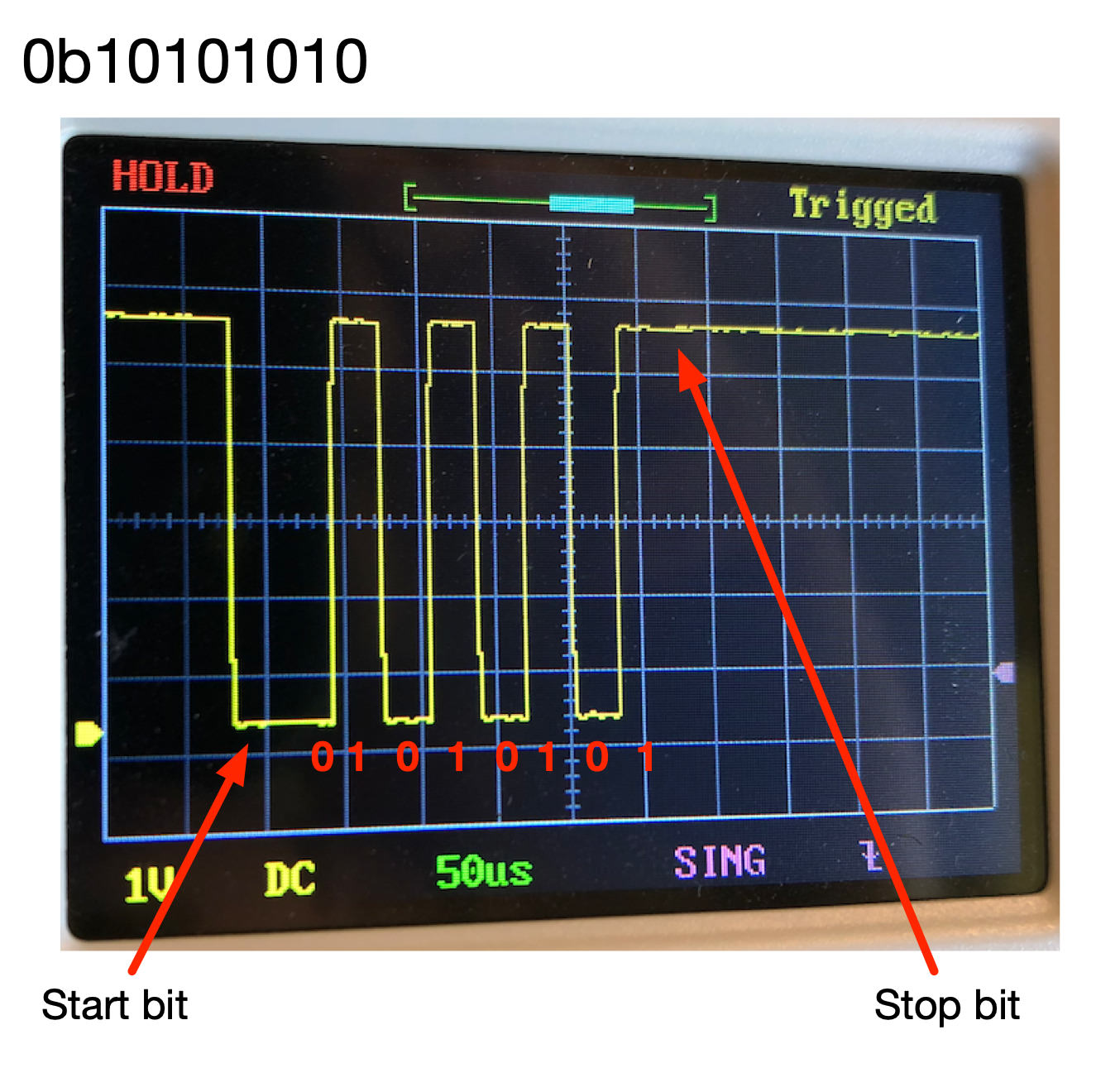
This extends naturally to MIDI — a serial protocol at the heart of electronic music since 1983.
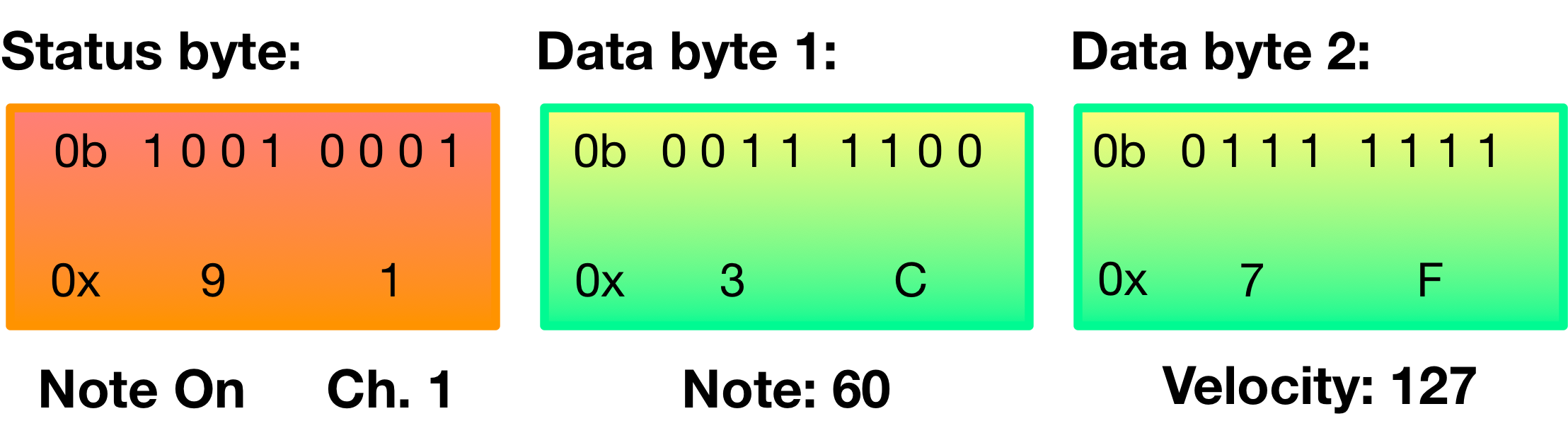
Serial Experiments Charles
The climax of the course, and of this talk, is a live lecture where I coded MIDI output in ARM assembly on a micro:bit in real time. The idea was to show students that you can tell stories in assembly code, that low-level programming can be expressive, even musical. Here’s a photo from that lecture:
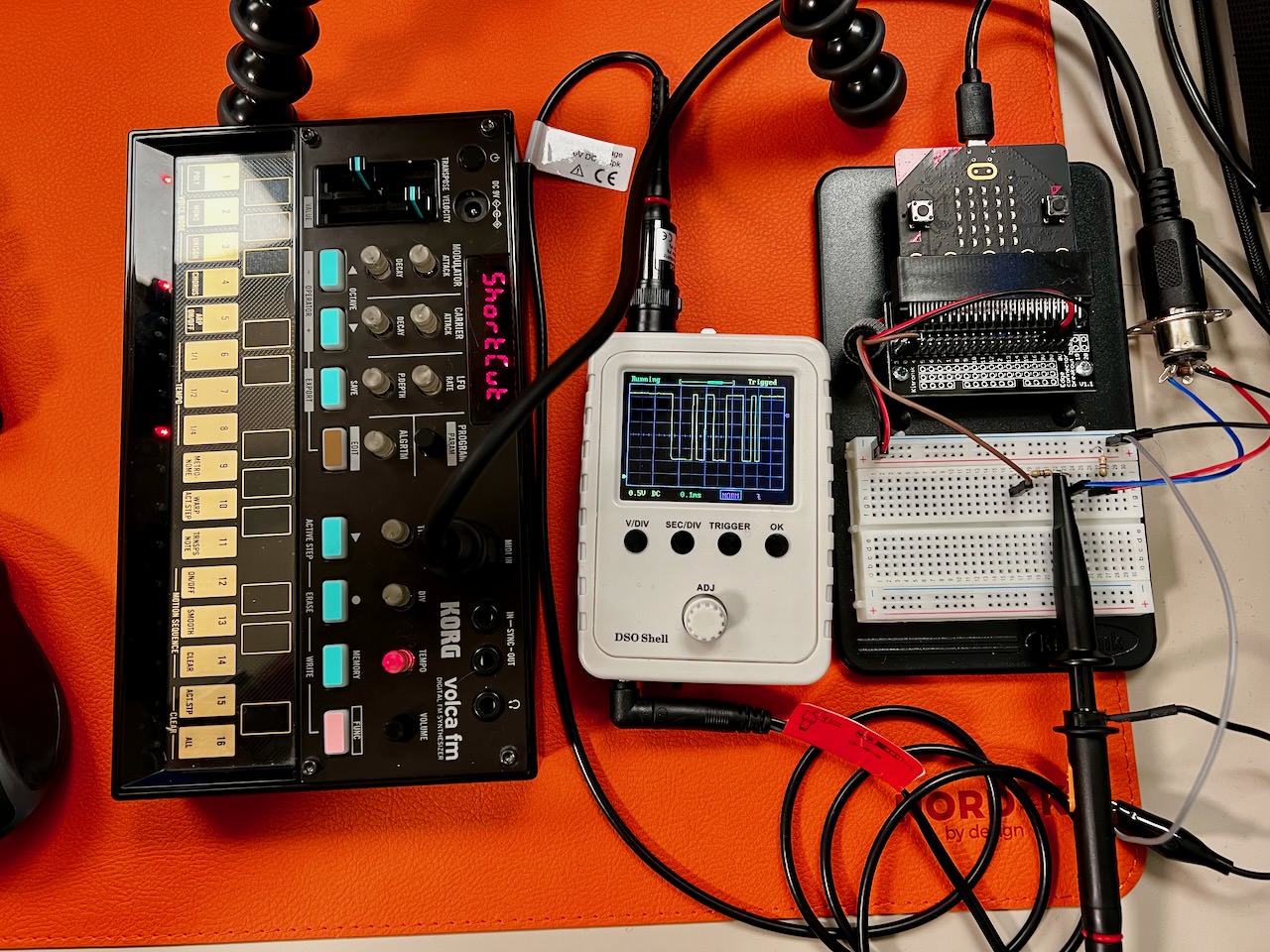
And here’s the demo — MIDI output produced entirely from bare-metal ARM assembly, live:
No operating system. No MIDI library. Just ARM assembly instructions, a carefully crafted timing loop, sending bits to GPIO pins, and a micro:bit plugged into a synthesiser. The point is to demonstrate that this is possible, and doing it live in a lecture makes students see assembly in a completely different way. This scaffold the ideas of interrupts, timing, and real-world consequences of small deviation in the code (because of course it goes wrong when I make adjustments).
YourOS 1.0
The most challenging lab in the course, originally written by the inimitable Ben Swift, asks students to build a handcrafted context switch and use it to run two programs concurrently: one LED blinking on one side of the display, another on the other. Students define their own process table in memory:
.data
process_table:
.word 0            @ index of currently-operating process
.word 0x20008000   @ stack pointer 1
.word 0x20007000   @ stack pointer 2
Getting this to work requires understanding the exception model, stack management, privilege levels, and scheduling. The same concepts behind every real operating system.
Reflections
What can go wrong? Surprisingly little. We explicitly don’t tell students to be careful in this course. Across the whole cohort of ~400 students in 2022, there were only 1–2 instances of students physically breaking a micro:bit, and 2 instances of bricking one. The one real pitfall turned out to be toggling a GPIO pin as fast as possible (a one-cycle loop) can disrupt the USB connection. The micro:bit developers provided special firmware to handle this case.
What can go right?
Assignments students actually want to do. Student feedback at the end of the course was so positive and affirming:
“This is the best course I’ve ever taken.”
“I thought assembly would be boring, but it was really fun!”
“I feel like I learnt a lot from taking this course.”
There’s something genuinely exciting about running your own code on the metal with no abstractions hiding what’s happening. The live MIDI demo captures this impact. It’s one thing to tell students that assembly is powerful and another to show them music coming out of a chip programmed by hand.
Students come in feeling intimidated and bored by assembly end up building creative, expressive programs in a language most people never touch. They come out feeling like original 1970s hackers or 90s demoscene programmers with creative achievements in their portfolios and a deeper understanding of how computers really work.
The presentation slides from the Oslo talk are available online.